The short answer
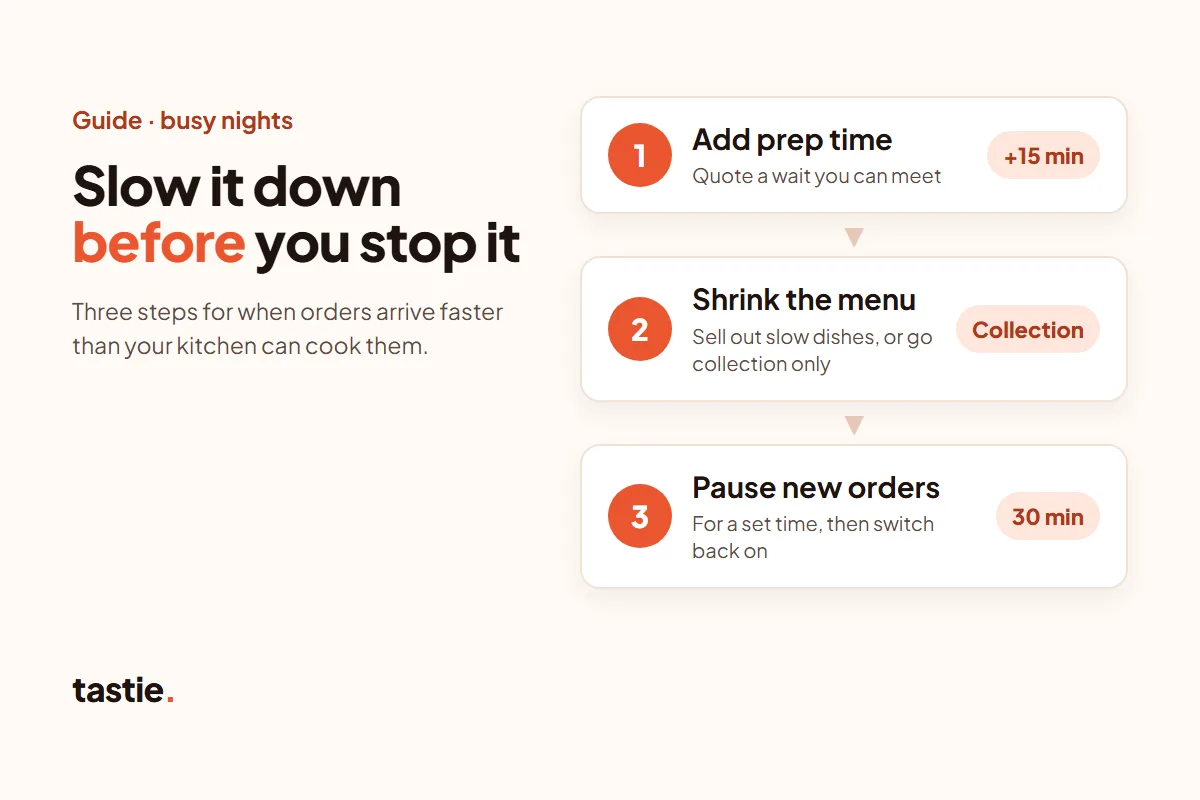
When orders arrive faster than you can cook them, slow the flow before you stop it. First add time, so new customers are quoted a wait you can meet. If that isn’t enough, take slow dishes off the menu or switch to collection only. If you still can’t keep up, pause new orders for a set time, then switch back on.
Just Eat lets you go offline and change your order times, Deliveroo has Busy mode, and Uber Eats has Busy and Pause. Don’t just unplug the tablet: Just Eat warns that orders keep coming if you do.
What should you do first when orders pile up?
- Add time. Raise your preparation or collection time so new customers see a realistic wait. Orders keep coming, but you stop making promises you can’t keep.
- Shrink the menu. Mark slow or fiddly dishes as sold out for the rest of the night.
- Drop delivery if drivers are the problem. If food is ready but nobody is free to take it, switch delivery off and keep collection.
- Pause for a set time. Stop new orders for, say, 15 or 30 minutes while you clear the queue, and set a reminder to switch back on.
- Tell the counter and the phone. Whoever answers should quote the same wait as your apps and website.
Finish the orders you have already accepted before you reopen. A paused shop misses a few orders; a late, cold order can lose you a regular.
How do you pause or slow down orders on Just Eat?
Just Eat’s UK partner Knowledge Centre describes three controls (checked 17 November 2026):
- Go offline. To stop new orders, Just Eat says to switch to “offline” with the button at the top right of the Partner Hub dashboard or on your order device. On the Orderpad, “Stop taking orders” lets you choose a period of time. If you go offline for the day, Just Eat switches you back online the next day, before trade.
- Change your order times. In the Partner Hub, go to Business settings, then Order time, to change delivery and collection times for each day of the week. Customers see a time range, such as 45 to 60 minutes. Just Eat says this is for restaurants that deliver themselves; if Just Eat delivers your orders, ask your account manager.
- Take dishes off the menu. The Orderpad lets you take items off the menu, and they come back online the next day.
Just Eat also warns not to switch your device off at the plug: that does not take your restaurant offline, and orders still arrive. Just Eat’s Orderpad features ↗ · How to update order times ↗
What does Deliveroo’s Busy mode do?
Busy mode tells Deliveroo the minimum time you need before a rider arrives for new orders. You switch it on at the top of your tablet and choose the time. In Deliveroo’s example, if you set 25 minutes, it waits at least that long before sending a rider for any new order.
Deliveroo says to use Busy mode only when you are much busier than normal for that time of the week, such as when staff are off, equipment breaks or orders surge, and not for a normal Friday rush. It also warns that Busy mode may move you down the restaurant list in the app. Deliveroo on Busy mode ↗
For one order that is running late, the “Need more time?” button asks Deliveroo to delay the rider where possible. If you can’t trade normally at all, Deliveroo’s help suggests temporarily marking yourself as closed until things are back to normal; the “Open for orders” setting is on your tablet and under Live Orders in Partner Hub. “Need more time?” help ↗ · Deliveroo on cancelled orders ↗ (checked 17 November 2026)
How do you pause orders on Uber Eats?
Uber Eats’ UK guide to its Orders app describes two modes (checked 17 November 2026):
- Busy: tap Busy, choose how much preparation time to add, then press Add ready time.
- Pause: choose how long to stop new orders for, then press Pause orders.
To go back to normal, open the Order tab, tap Paused, then Open. For a single order, Adjust order lets you delay it or change its ready time. Uber Eats Orders app guide ↗
Buttons move when the apps update, so find each control on your own tablet before the weekend, not in the middle of the rush.
What about your own website and phone orders?
Direct ordering systems differ, so check what yours can do before a busy night. Ask your supplier whether you can:
- pause online orders, and for how long;
- change the preparation or collection time customers are quoted;
- mark a dish as sold out straight away;
- switch delivery off and keep collection;
- take orders for a later time slot, and limit how many orders each slot takes.
If a control is missing, agree a fallback in advance, such as closing early by changing your opening hours.
Phone orders need the same discipline. Quote the same wait as your apps, write the promised time on the ticket, and stop taking phone orders when the queue is full. One plain line does the job: “We’re quoting 50 minutes tonight. Is that OK?”
With tastie., you set your opening hours, choose collection, your own delivery or both, and decide where you deliver to. Orders print on a tastie. terminal on free loan. Ask us how a busy night works on your setup before you launch. How online ordering works with tastie.
How do you plan a busy night in the kitchen?
- Know your limit. Count how many orders your kitchen finished in its busiest 15 minutes on recent Fridays and Saturdays. That is your cap: when new orders go past it, add time or pause.
- Spread orders with time slots. If your system takes orders for later, a limit per slot stops every order landing at 7pm.
- Go collection only at the peak. With one driver, collection only for the busiest hour can keep every order on time.
- Prep before service. Portion sauces, sides and garnishes in the afternoon, so each order takes less time.
- Cut the menu on the biggest nights. A shorter menu on a bank holiday or big match night is faster to cook and easier to check.
- Give one person the pass. They check every bag against the ticket, call the next order and decide when to add time or pause.
Afterwards, look at what went wrong: which hour fell behind, how many orders were late and what was refunded. Change one thing before the next busy night.
How long should you quote for collection?
Quote from your real times, not hopeful ones. Time ten collection orders from the ticket printing to the bag being ready, on a normal night and on a busy one. Quote the busy-night time plus a few minutes for the handover.
A wait you meet beats a promise you miss: saying 30 minutes and having it ready in 25 is better than saying 15 and taking 25. If the wait changes after someone has ordered, phone them.
The click-and-collect checklist covers collection hours, last orders and the handover, and the delivery checklist covers drivers and delivery areas.
Just Eat, Uber Eats and Deliveroo are trademarks of their owners. tastie. is not affiliated with or endorsed by them.
Questions people ask
How do I stop getting more orders than my kitchen can handle?
Add time first, so new customers see a wait you can meet. Then take slow dishes off the menu or switch to collection only. If you still can’t keep up, pause new orders for a set time on each app and on your own website, and switch back on when the queue is clear.
Can I pause online orders on Just Eat?
Yes. Just Eat says to switch to offline with the button at the top right of the Partner Hub dashboard or on your order device. If you go offline for the day, it switches you back online the next day before trade. Don’t just unplug the tablet: orders keep coming. Just Eat’s Orderpad help ↗
What is busy mode on Deliveroo?
It tells Deliveroo the minimum time you need before a rider arrives for new orders. Deliveroo says to use it only when you are much busier than normal, not for a normal Friday rush, and warns that it may move you down the restaurant list. Deliveroo’s help ↗
Can I add prep time on Uber Eats?
Yes. In the Uber Eats Orders app, tap Busy, choose how much preparation time to add and press Add ready time. To stop new orders for a while, use Pause and choose how long.
How long should a takeaway quote for collection?
Time ten real collection orders on a busy night, from the ticket printing to the bag being ready, and quote that plus a few minutes. A wait you meet is better than a short promise you miss.