The short answer
GloriaFood’s own website says the service will reach end of life on 30 April 2027. Plan for your GloriaFood order button, Facebook button, Google link and QR codes to stop taking orders then.
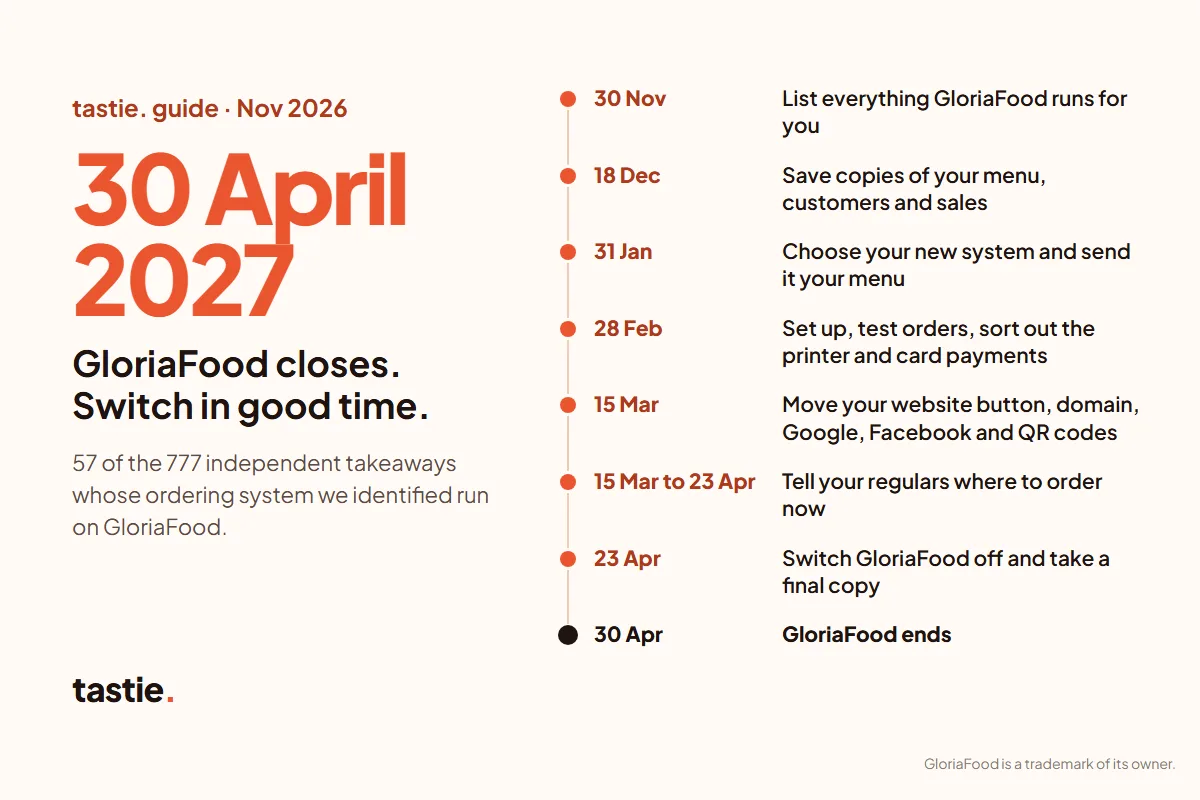
Don’t leave it to April. Save copies of your menu and customer list now, choose a new system by the end of January, test it in February, move your links by mid-March and switch GloriaFood off a week early. The plan below gives a date for each step.
When exactly does GloriaFood close?
When we checked GloriaFood’s homepage on 17 November 2026, its service update said: “GloriaFood will reach end of life on April 30, 2027.” It also says GloriaFood will keep supporting existing customers until then. GloriaFood’s notice ↗
GloriaFood belongs to Oracle. The same notice says Oracle doesn’t offer a direct replacement, and points customers who want to move to FoodAmigos, a separate company. You don’t have to use it. Any ordering system can take over, as long as you move in time.
Are you on GloriaFood without knowing it?
Possibly. GloriaFood lets resellers sell its system under their own brand. Its partner page says their clients see the reseller’s logo on the login page, and the reseller’s name and web address on the menu. GloriaFood’s partner programme ↗
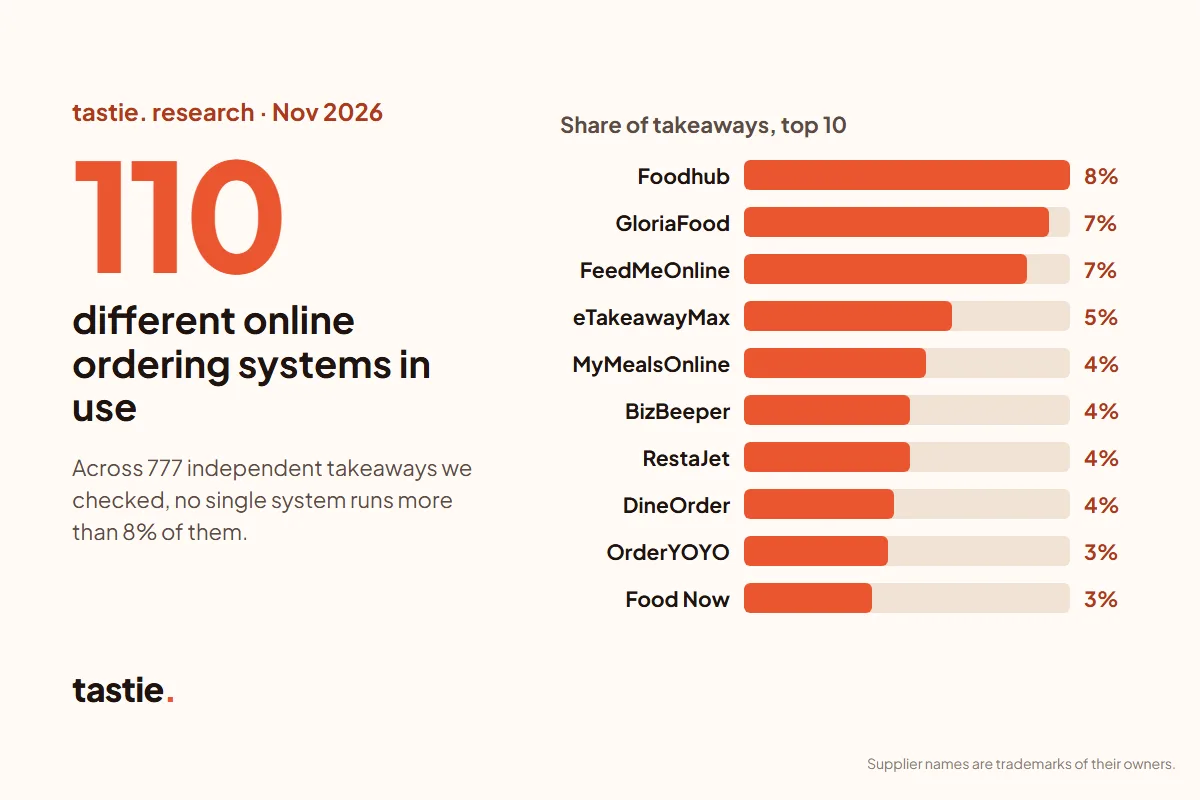
In our research on the ordering systems UK takeaways use, 57 of the 777 takeaways whose system we could identify ran on GloriaFood (7%). That made it the second most used system we found. Some use GloriaFood directly, often through foodbooking.com ordering pages. Others use it under another name: ordering pages sold as Ordugh, Orders Central, MealDash and UJC were running on GloriaFood’s pages and scripts when we checked in November 2026. The counts are in our CSV download.
Quick check: look at the ordering link on your Facebook button or Google profile. If it contains “foodbooking” or “gloriafood”, you’re on GloriaFood. If you’re not sure, ask your supplier in writing what happens to your ordering on 30 April 2027.
What should you do, and by when?
| By | What to do |
|---|---|
| 30 November 2026 | List everything GloriaFood runs for you |
| 18 December 2026 | Save copies of your menu, customers and sales |
| 31 January 2027 | Choose your new system and send it your menu |
| 28 February 2027 | Set up, test orders, sort out the printer and card payments |
| 15 March 2027 | Move your website button, domain, Google, Facebook and QR codes |
| 15 March to 23 April 2027 | Tell your regulars where to order now |
| 23 April 2027 | Switch GloriaFood off and take a final copy |
| 30 April 2027 | GloriaFood ends |
Christmas and New Year are busy, so the plan leaves the big changes until January. If you’re starting late, do the same steps closer together. Keep at least two weeks for testing and telling customers before you switch GloriaFood off.
Step 1: what does GloriaFood run for you? (by 30 November)
GloriaFood often does more than the menu on your website. Tick off each one you use, because each one needs replacing:
- Website button: the “See MENU & Order” button on your own website.
- Your whole website: if your site is GloriaFood’s “sales optimized website”, the website goes too, not just the button.
- Facebook: a Start Order or Shop Now button on your page.
- Smart links: short ordering links in your Instagram, TikTok or Google posts.
- Google Business Profile: your order link, and whether GloriaFood was given manager access to your profile.
- QR codes: on tables, leaflets, bags or the window.
- Apps: a listing in the shared FoodBooking app, or your own branded app.
- In the kitchen: the order-taking app, the tablet or phone it runs on, and any printer.
- Money: the online payments add-on, your payment account, and paid extras such as the POS.
Next to each one, write down who controls it: you, a reseller, or whoever built your website.
Step 2: how do you save your menu, customers and sales? (by 18 December)
Customers and orders. GloriaFood’s help centre says you can export reports from the admin panel. In the reports, “List View” lets you export all orders, and a clients list with each customer’s name, email address, phone number, total spent, total orders and last order time. The sales summary exports as a PDF, CSV or Excel file. GloriaFood’s reports help ↗
Your menu. When we checked on 17 November 2026, GloriaFood’s help centre had no article on exporting your menu. GloriaFood does have a menu API ↗ that lets other systems fetch your current menu, which some new suppliers use. The copy you control yourself: open your live menu and save every page as a PDF or screenshots, with sizes, extras and meal-deal choices showing. Note your delivery areas, delivery charges, opening hours and allergen information too. Then ask GloriaFood support, or your reseller, in writing for a menu export file as well.
Keep the files somewhere safe, such as a password-protected folder. A customer list is personal data, so don’t email it around or leave it on a shared computer.
Can you text or email your GloriaFood customers about the switch?
Some of them, if you follow the rules. GloriaFood’s privacy policy says the restaurant controls its dealings with its own customers, and is responsible for getting any consent needed before it sends marketing. Oracle’s policy, updated 22 October 2025 ↗
UK law lets you send marketing emails or texts to past customers without asking again only if all three of these are true:
- you got their details when they ordered from you;
- you only tell them about your own food and similar offers;
- they were given a simple way to say no when you collected their details, and you give them one again in every message.
Otherwise you need their consent. Texts count as well as emails. This is regulation 22 of the Privacy and Electronic Communications Regulations. Read regulation 22 ↗
GloriaFood’s help centre says the marketing box at checkout starts unticked for UK restaurants, unless the restaurant changed that setting. A customer who ticked an unticked box chose to. GloriaFood’s consent help ↗ The clients export described in its help centre doesn’t list a consent column, so ask GloriaFood support for a record of who agreed, and when. If you can’t show it, don’t message them: use a card in the bag and a sign on the counter instead. When you switch, update your privacy notice to name your new ordering system.
This is a plain-English summary, not legal advice.
Step 3: how do you choose a new system? (by 31 January)
Compare the total for a normal month, not just the headline price. Ask each supplier, in writing:
- the monthly fee, any commission, and any fee your customers pay;
- card payment fees;
- how long the contract runs, and how you leave;
- what equipment you need, and whether it is bought, rented or lent;
- who will own your web address;
- who builds your menu, and how long setup takes.
| System | What its own website says |
|---|---|
| Square Online | A Free plan at £0, or Plus £20 and Premium £64 a month, billed annually. Online card payments cost 1.4% + 25p. You can cancel your plan at any time. |
| Storekit | A free Starter plan, then Grow at £99 a month. 0% commission, but a flat per-order rate it doesn’t publish. Runs on your own iPad or Android tablet. |
| Wix Restaurants | A website builder. The ordering app is free to install, but taking orders and payments needs a paid Wix plan. Wix Payments costs 2.1% + 20p per UK card. |
| Flipdish | Website plan from £49 a month billed annually (£69 billed monthly). A 12-month first term that renews unless you give at least 3 months’ written notice. |
| eTakeawayMax | Packages from £10 to £20 a week. A 12-month term that renews automatically, according to its £1-offer page. |
| Foodhub for Business | Prices are set in your agreement rather than published. The equipment is rented, on a rolling 12-month contract. |
| Feed Me Online | 0% commission on online orders, and no set-up fee on its full package. |
| FoodAmigos ↗ | Named on GloriaFood’s homepage. Its page for GloriaFood users says its team moves your menus and customer data for you. We haven’t compared its prices yet. |
| tastie. | 0% commission and no monthly fee. Customers pay just a £1 service fee per order. You pay card processing fees, at a rate confirmed in writing before launch. No minimum term. |
Prices change, so check the latest before you sign. Our GloriaFood comparison has the sources for each, and the full comparison covers more systems.
Step 4: how do you test the new system? (February)
Send your menu copy to your new supplier and check what comes back line by line: prices, sizes, extras, meal deals and allergen information. Then test it properly before any customer sees it:
- a collection order and a delivery order;
- an order with extras, and a meal deal;
- a card payment and a refund;
- two orders arriving close together.
The printer. GloriaFood prints through its order-taking app to Epson or Star thermal printers that restaurants buy themselves. Ask your new supplier whether your printer works with its system, or whether it supplies its own device. GloriaFood’s printing help ↗
Card payments. With GloriaFood’s online payments add-on, the money goes into your own payment account, such as Stripe. GloriaFood’s pricing page says “the money does not pass through us”. GloriaFood pricing ↗ That account stays yours, so ask whether your new system can use it or needs its own. Once you have switched, cancel the add-on and delete the key you created for GloriaFood in your payment account. How GloriaFood connects it ↗
Step 5: how do you move your links and domain? (by 15 March)
Do this on one quiet afternoon, in this order, then test every link on your phone:
- Your website. Replace the GloriaFood button code with your new ordering link or button. If your site is GloriaFood’s sales optimized website, you need a new website too: GloriaFood’s help centre says that site runs on GloriaFood’s own hosting. GloriaFood’s website help ↗
- Your domain. If you connected your own domain to that website, GloriaFood changed its nameservers, the setting that says where your web address points. Point it at your new website, and keep your email settings as they are. GloriaFood asked for your domain account login to do this, so change that password afterwards. If GloriaFood or a reseller registered the domain for you, find out who is recorded as the owner and move it into your own account well before 30 April. Our domain guide has a checklist.
- Google Business Profile. Replace the order link with your new one and choose it as the preferred link. GloriaFood’s Google tool asks for manager access to your profile, so remove that access when you no longer need it. GloriaFood’s Google help ↗ Our Google ordering-link guide shows each step.
- Facebook. Edit your page’s Start Order button and paste in your new link. GloriaFood’s Facebook steps ↗
- Smart links. Replace GloriaFood links in your Instagram, TikTok and other profiles.
- QR codes. Scan every one. If it opens a GloriaFood or foodbooking.com page, print a new one with your new link.
Keep GloriaFood running in the background until the new system has taken real orders, but stop sending customers to it.
Step 6: how do you tell your regulars? (15 March to 23 April)
- A card in every bag with your new web address or QR code.
- A sign in the window and on the counter.
- Tell phone customers the new web address when they call.
- Pin a post on Facebook and Instagram.
- Message the customers who agreed to marketing, with a way to opt out.
- If you had a branded app or a FoodBooking listing, tell those customers where to order instead.
Use one web address everywhere, so people only have one place to remember.
Step 7: how do you switch GloriaFood off? (by 23 April)
- Take a final export of your customers, orders and sales reports.
- Pause or close ordering in GloriaFood, so nobody orders on the old system by mistake.
- Cancel any paid extras in writing. GloriaFood’s pricing page shows a 2-year commitment for its POS, so ask what happens to yours.
- Remove the old button code, links and payment keys.
- Unplug the old order-taking device once nothing comes through.
Switching off a week early means a problem shows up while GloriaFood is still there to fall back on.
If you’re considering tastie.
tastie. gives your takeaway its own ordering website with 0% commission and no monthly fee. Your customers pay just a £1 service fee per order. You pay card processing fees, at a rate we confirm in writing before you go live. Here is how it covers the steps above:
- Menu: send your GloriaFood menu link, a PDF or photos. We build the menu and you check it, including allergen information, before it goes live.
- Printer: orders print on a tastie. terminal on free loan, owned by ACORN RESERVE LTD, with free printer paper (fair use: up to 20 rolls a month). You don’t need your old printer.
- Web address: if you don’t have one, we can buy an available .co.uk or .com for free.
- Telling customers: the free launch pack, worth £715, prints 2,500 leaflets with your web address and QR code, sets up your Google profile and gives you a month of social posts.
- No tie-in: there is no minimum term. If you leave, send the terminal back or keep it for a one-off £150.
What tastie. doesn’t do: it isn’t a till, it doesn’t take table bookings, and it is for collection or your own delivery drivers. If you use GloriaFood for any of those, choose a system that covers them. Applying is a setup enquiry, not instant activation. Send your menu or read the full offer.
GloriaFood, Oracle and the other supplier names are trademarks of their owners. tastie. is not affiliated with or endorsed by them. GloriaFood details checked on its own website and help centre on 17 November 2026; other suppliers’ details checked on their own websites on 31 October 2026.
Questions people ask
When does GloriaFood close?
GloriaFood’s homepage says the service will reach end of life on 30 April 2027, and that it will support existing customers until then. We checked on 17 November 2026. GloriaFood’s notice ↗
Will my GloriaFood order button and QR codes still work after 30 April 2027?
Plan for them to stop. GloriaFood hasn’t said what its ordering pages will show after it closes, so replace your website button, Facebook button, Google link and QR codes before then.
Does Oracle offer a replacement for GloriaFood?
No. GloriaFood’s notice says Oracle doesn’t offer a direct replacement. It points customers to FoodAmigos, a separate company, but you can move to any ordering system.
Can I export my customer list from GloriaFood?
Yes. GloriaFood’s help centre says List View in the reports exports a clients list with each customer’s name, email, phone number, total spent, total orders and last order time. Check you have consent before you send them marketing. GloriaFood’s reports help ↗
Can I export my GloriaFood menu?
GloriaFood’s help centre had no menu export article when we checked on 17 November 2026. Save your live menu as a PDF with every option and price showing, and ask GloriaFood support or your reseller for an export file.
I signed up through a reseller. Am I affected?
Yes, if their system runs on GloriaFood. Resellers can sell GloriaFood under their own name, so ask your supplier in writing what happens to your ordering on 30 April 2027.
What should a UK takeaway switch to?
It depends on how you work. Compare the monthly fee, commission, customer fees, card fees, contract length and who owns your web address, then test the new system before you move your links. GloriaFood alternatives compared.